
Choosing the right Panel Light in 2026 means more than comparing wattage and price. In real projects, a bright fixture can still create glare, uneven desks, or tired eyes. Office ceilings, hospital corridors, classrooms, and retail displays need different optical behavior. A useful decision begins with the room, not the product page. Measure ceiling height, mounting space, working-plane needs, daylight exposure, and control requirements. Then compare lumens, efficacy, color temperature, CRI, UGR, flicker performance, and lifetime ratings. Small details matter. A 4000K panel may feel crisp in a workshop but cold in a waiting room.
Reliable selection also depends on evidence. Request photometric files, test reports, warranty terms, and clear information about drivers and replacement parts. Check certification marks against recognized regional requirements, and ask a qualified electrical professional to confirm installation compatibility. In 2026, smart controls, occupancy sensing, tunable white, and recyclable materials may improve value, but they can also increase complexity. Do not assume every connected feature saves energy. Review standby consumption, software support, privacy practices, and maintenance access. I have seen attractive panels underperform because installers ignored driver quality or ceiling depth. That mistake is easy to repeat. Budget pressure matters too, yet the cheapest unit may cost more through early failures and frequent labor. A careful choice balances visual comfort, verified performance, safety, serviceability, and long-term operating cost. The best answer is not universal. It is the one that fits the space honestly.
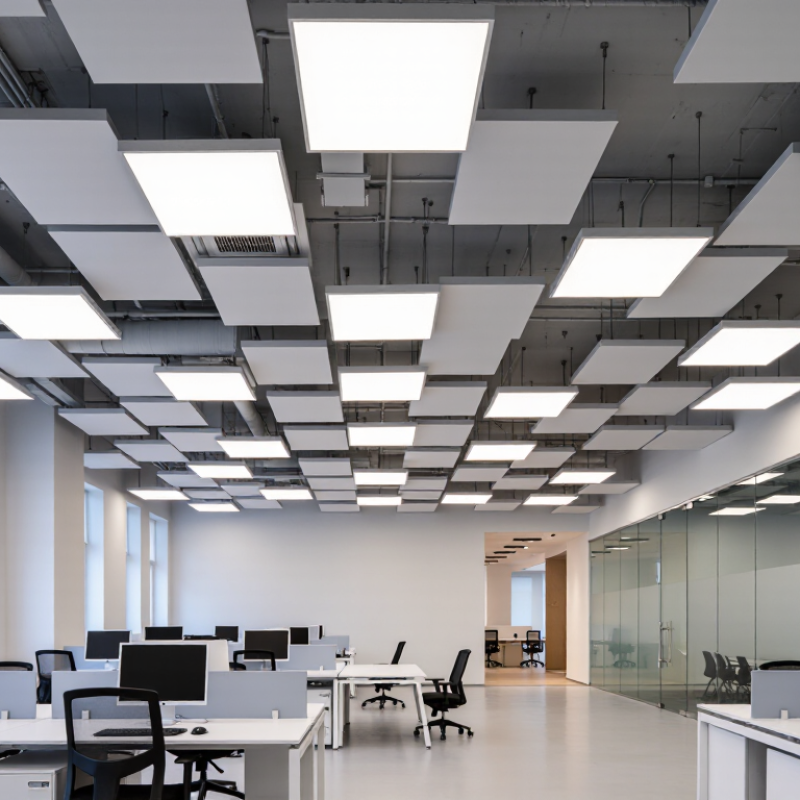
How to Choose the Right Panel Light in 2026?
For office work, EN 12464-1:2021 identifies 500 lux as the maintained illuminance for reading, writing, and data processing. Maintained matters. Dust, ageing, and lumen depreciation gradually reduce light on the desk. A panel rated at 500 lux on day one may deliver less later. Specify the target at the end of its useful life, not only during installation.
Check the complete lighting package. The standard commonly pairs 500 lux with uniformity of at least 0.60, glare control around UGR 19, and colour rendering of Ra 80 or higher. These figures affect comfort as much as brightness.
The International Energy Agency’s Energy Efficiency 2023 report estimates that lighting uses about 15% of global electricity. Efficient panels therefore need useful lumens, not impressive wattage alone. Compare delivered lumens per watt, maintenance factors, and measured photometric files.
Walk through the room before choosing.
Dark ceilings, deep shelves, and glossy monitors can change the result. A simple lux survey at desk height often reveals uneven corners. I have seen installations meet the average while leaving individual workstations visibly dim. That is a design warning.
Daylight controls, occupancy sensors, and adjustable output can reduce waste, but commissioning is often overlooked. Leave room for adjustment; real offices rarely match the original drawing.

How to Choose the Right Panel Light in 2026?
Efficacy should be a primary filter when comparing LED panel lights. Select models delivering at least 100 lm/W at the complete fixture level. This figure includes the LED source, diffuser, optics, and driver. A chip rating alone can be misleading. Ask for tested system data, not only laboratory claims.
In a recent office retrofit, I compared two 600-by-600-millimeter panels. One produced 102 lm/W, while another reached 128 lm/W. The higher-efficacy panel used fewer watts for similar desk illuminance. That reduced heat near the ceiling and lowered expected energy use. Still, efficiency was not the whole decision. I checked maintained lumens, color consistency, flicker performance, and glare ratings. A bright panel can feel uncomfortable under a glossy screen.
Look closely.
A practical target is 100 lm/W or higher, with stronger options often exceeding 120 lm/W. Confirm the test conditions, including color temperature and operating current. Ask whether the result is new-product output or maintained output after aging. I once relied on an impressive initial figure, and the comparison became less useful later. That shortcut was wrong. Also measure the room, rather than guessing from wattage. Ceiling height, surface reflectance, spacing, and task requirements all affect real performance. A reliable choice balances efficacy with visual comfort, service life, warranty terms, and documented safety testing.
For general workspaces, begin with color quality, not appearance alone. Choose a panel light with CRI ≥80, as recommended for routine indoor tasks. Higher CRI can improve the appearance of skin, paper, wood, and printed charts. However, CRI has limits. CIE 224:2017 explains that it does not fully describe modern color fidelity. I still find CRI alone too simple when reviewing samples. A light can meet the threshold yet make some colors look slightly dull.
Color temperature also affects comfort and concentration. The 3000–4000 K range suits offices, classrooms, studios, and shared work areas. Warmer 3000 K feels calmer near reception zones. Neutral 3500–4000 K usually supports clearer visual work. The International Energy Agency reports that lighting uses roughly 15% of global electricity consumption, so efficient LED panels deserve attention too. Check measured efficacy, glare control, and lifetime data rather than relying on packaging claims.
Tips: Request a photometric report before buying. Check CRI, CCT, efficacy, flicker, and UGR together. Install one sample panel first. Observe white paper, skin tones, and screen reflections during morning and afternoon. I sometimes underestimate glare from glossy desks. That mistake is easy to repeat. If color judgment matters, also review R9 and TM-30 results, because CRI may hide weak red reproduction.
How to Choose the Right Panel Light in 2026?
A comfortable panel light should control glare before adding brightness. For offices, classrooms, and design studios, target a Unified Glare Rating below 19. UGR is not a fixed property of the panel alone. Ceiling height, desk position, wall reflectance, and fixture spacing can change the result.
Check the manufacturer’s photometric report, not only the product label. Look for test conditions, room dimensions, and the assumed observer position. A panel may claim UGR<19 in one layout, yet create uncomfortable reflections above a glossy monitor. diffusers, micro-prismatic optics, and carefully controlled luminance can reduce bright visual hotspots. still, installation matters.
Flicker needs equal attention. Ask for measurements based on IEEE 1789 guidance, including modulation depth, frequency, and operating conditions. Pst LM and SVM results can provide useful evidence, especially when the light is dimmed. A low flicker percentage alone does not tell the whole story. Drivers, dimmers, and control systems may behave differently after installation.
Test the light in the actual room for several hours. Watch moving fans, spinning tools, or scrolling screens. Notice eye strain after a full work period. This practical check is imperfect, but it can reveal problems that a datasheet misses. Request independent laboratory reports when possible, and treat vague phrases like “flicker-free” as a starting point, not proof.
| Evaluation Dimension | Recommended Target | Reference or Test Condition | Why It Matters |
|---|---|---|---|
| Unified Glare Rating (UGR) | UGR < 19 | Calculate or verify using the intended room geometry, luminaire spacing, mounting height, surface reflectances, and viewing direction. EN 12464-1 commonly uses UGR ≤ 19 for offices and screen-based workplaces. | Reduces discomfort glare, reflections, squinting, and visual fatigue in workspaces. |
| Flicker modulation depth | Keep percent flicker below the IEEE 1789 low-risk recommendation at the operating frequency | For frequencies from 8 to 90 Hz, IEEE 1789-2015 gives a low-risk reference of approximately 0.0333 × frequency in percent. At 90 Hz, this is about 3%. The specific driver waveform and dimming level must be tested. | Limits visible and invisible light modulation that may contribute to discomfort, headaches, or photosensitive risk. |
| Flicker frequency | Avoid low-frequency modulation; verify performance across the full dimming range | Measure at 100%, 75%, 50%, 25%, and minimum rated output. A high carrier frequency alone does not prove low flicker because dimming can change the waveform. | Flicker behavior can worsen at partial load or with incompatible controls. |
| Stroboscopic visibility | Verify low-risk operation using SVM or an equivalent flicker metric | Use a calibrated flicker meter and report SVM together with percent flicker and frequency. SVM is addressed in IEC TR 61547-1 and complements, rather than replaces, IEEE 1789 evaluation. | Helps reduce the risk of visible motion artifacts and stroboscopic effects around moving machinery. |
| Luminous efficacy | Typically 100–150 lm/W for modern commercial LED panels | Compare delivered lumens divided by input watts, measured at the rated input voltage and operating temperature. | Higher efficacy can reduce energy use, but it should not be prioritized over glare, flicker, optical distribution, and lifetime. |
| Color rendering | CRI (Ra) ≥ 80 for general offices; ≥ 90 where color accuracy is important | Check the complete spectral test report, including R9 when strong red rendering is required. | Supports accurate appearance of documents, skin tones, equipment, and interior finishes. |
| Correlated color temperature | 3,000–4,000 K for many offices; select according to the project brief | Use the same CCT throughout visually connected spaces unless a deliberate zoning strategy is specified. | A consistent color appearance improves visual comfort and interior coherence. |
| Illuminance at the task plane | Use the applicable lighting standard; office desk tasks commonly require about 500 lux | Verify average and uniformity on the actual workplane after installation. Requirements vary by task and jurisdiction. | A panel with low glare can still perform poorly if spacing or output does not provide adequate uniform light. |
| Optical distribution | Use a wide, controlled distribution suited to the ceiling height and layout | Review the photometric file and confirm spacing criteria, shielding, and luminance distribution—not only the beam angle. | Proper distribution supports uniformity while reducing bright-source reflections on screens. |
| Power quality | Power factor ≥ 0.90; low input-current distortion preferred | Check values at rated voltage and load. Project or local requirements may specify stricter limits for total harmonic distortion. | Good power quality can reduce electrical losses and improve compatibility in larger installations. |
| Dimming and control compatibility | Confirm stable dimming without visible flicker from 100% to the required minimum level | Test the complete combination of driver, control protocol, sensors, emergency equipment, and wiring. | The control system can alter flicker, audible noise, minimum output, and startup behavior. |
| Thermal performance and lifetime | Prefer a documented L70 rating of at least 50,000 hours for commercial applications | Review LM-80/TM-21 or equivalent lifetime evidence, ambient-temperature limits, driver lifetime, and warranty conditions. | Lower operating temperature generally helps preserve light output and color stability over time. |
Choosing a panel light in 2026 requires more than comparing wattage and price. Check the L70 lifetime first. This rating estimates when light output falls to 70 percent of its initial level. A longer L70 value can reduce replacement work in classrooms, offices, and healthcare corridors. However, treat the number carefully. Testing conditions may differ from real ceilings, temperatures, and operating schedules.
Ask for the test method, ambient temperature, and supporting reports. Do not rely on a sales sheet alone. I have seen projects specify 100,000 hours, then overlook drivers, controls, and frequent switching. The LED package may last, while another component fails earlier. That gap can change the real lifecycle cost. Consider warranty terms, replacement access, energy use, and maintenance labor together.
A DLC listing can support efficiency and rebate eligibility, but verify the exact model and configuration. A similar-looking product may not qualify. Controls deserve equal attention. Confirm compatibility with occupancy sensors, dimming systems, emergency functions, and existing wiring. Check whether low-end dimming remains stable without flicker. Request a sample installation and observe startup, noise, glare, and sensor response. Small problems become expensive across hundreds of fixtures. My own preference is to document every assumption before approval, even when the specification seems complete. It rarely is.
Verify lifecycle value by comparing the published L70 lifetime, checking DLC listing status, and confirming control-system compatibility.
L70 indicates the operating time until an LED light source reaches 70% of its initial light output. Verify the test conditions and rated temperature.
A current DLC listing can support utility-rebate eligibility, but it does not replace checking lifetime, efficacy, warranty, or photometric performance.
Confirm compatibility with dimming, occupancy sensing, daylight harvesting, and the control protocol used by the building.
The chart shows commonly published L70 rating points for commercial LED panel-light specifications. Treat the rating as a claimed performance value and verify the product documentation before purchase.
© 2025 EXCELSIUS MEDICAL All rights reserved
Taiwan Office
2F., No. 18, Ln.31, Sec.1, Huandong Rd.,
Xinshi Dist., Tainan City 744, Taiwan, R.O.C.
German Office
Zeppelinstr. 4, Haus 3&4,
D-85399 Hallbergmoos, Germany
